1
APPENDIX A. DETAILS OF TRACE FUNCTIONS
This appendix describes the real-time trace function.
Overview of trace function
The real-time trace function writes the details of the execution (trace data) output from the CPU in the
trace buffer in the ICE for each execution. You can check the data using the trace command.
You can set the trace mode, trace start condition, trigger condition, section condition, qualify condition,
and other conditions to specify the loading of trace data.
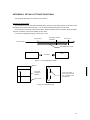
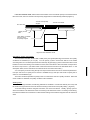
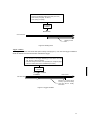
For the flow of loading trace data, see Figures 1 and 2.
Start of trace
The trigger condition
is satisfied.
End of trace
CPU execution
Data loaded into the ICE
CPU
Trace
Trace data
Figure 1 Flow of loading trace data
End
The trigger
condition is
satisfied.
If the trace buffer in
the ICE becomes full,
it is overwritten from
the beginning.
Start of trace
Figure 2 Trace data in ICE
14