1
16
NED
3 Hardware
3.1 Camera Connection
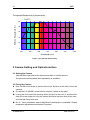
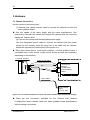
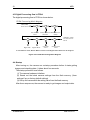
Use the camera in the following way:
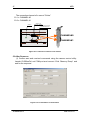
(1) Camera Link cables must be used to connect the camera unit with the
frame grabber board.
u Use two cables of the same length and the same manufacturer. Use
asymmetric Camera Link cables and connect the camera with the connector
labeled as ”Camera side”.
(2) Connect the camera with the designated power supply.
Use the designated power cable to connect the camera with the power
source for the camera. Insert the plug end of the cable into the camera.
Attach the opposite end (loose wires) to the power unit.
u Other than those above, a personal computer, a frame grabber board, a
compatible lens, a lens mount, a light source and an encoder are necessary,
depending on the situation.
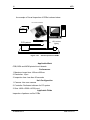
Line Scan Camera
Camera Link Cable
(3M:14B26-SZLB-xxx-0LC)
CL1
PC
CL1
CL2
CL2
Camera Link
Medium
Configuration
Frame Grabber
Board
Power Cable
Camera Power
Supply
DC +12V 15W
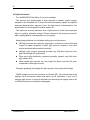
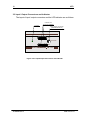
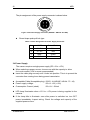
Figure 3-1-1 Connections between Camera and Frame Grabber Board and Power Supply
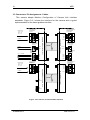
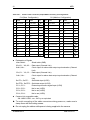
u There are two connectors available for the Camera Link Medium
Configuration board. Always check the frame grabber board specifications
before making connections.
XCM6060SAT4
UME-0012-03