1
Software Setup
Lexicon Professional®
WINDOWS® 2000 and WINDOWS® XP
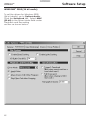
PLAYBACK AND RECORD TIMING
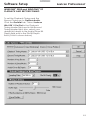
To set the Playback Timing and the
Record Timing go to Options>Audio.
Click the General tab. Select Lexicon
Win USB 1-2 In/Out in the Playback
Timing Master field and in the Record
Timing Master field. Also, select your
desired bit depth in the Audio Driver Bit
Depth field and in the File Bit Depth
field. (24 bit is shown below)
14