1
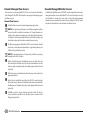
Set FloZoneTM Rates
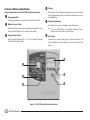
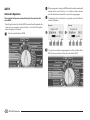
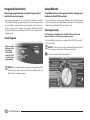
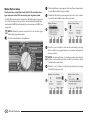
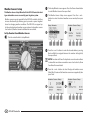
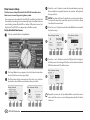
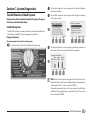
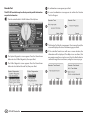
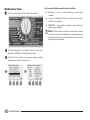
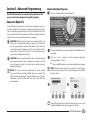
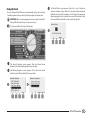
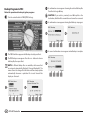
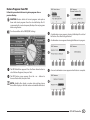
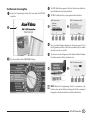
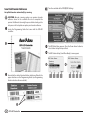
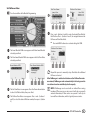
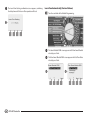
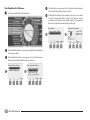
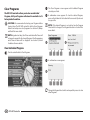
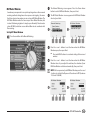
Turn the controller dial to Module Programming.
3
4
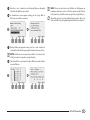
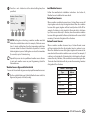
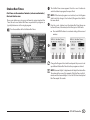
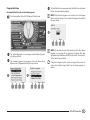
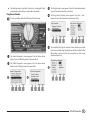
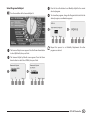
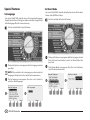
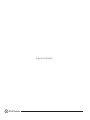
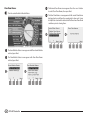
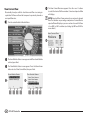
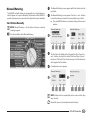
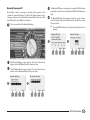
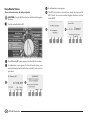
EPress + and – (buttons 3 and 4) to enter the desired Flow Rate for
that FloZone. Press – (buttons 2 and 4) to navigate between the
FloZone and Flow Rate fields.
Press and HOLD buttons to accelerate settings for GPM.
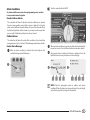
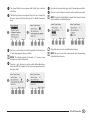
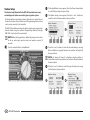
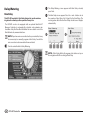
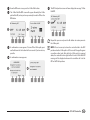
AThe Smart Module PGM screen appears with Flow Smart Module
selected; press Next.
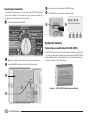
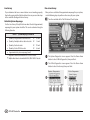
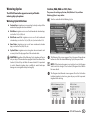
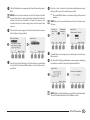
BThe Flow Smart Module PGM screen appears with Set Flow Rates
5
selected; press Next.
1
2
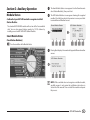
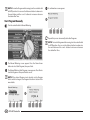
Repeat this process to manually set up Flow Rates for additional
FloZones as desired.
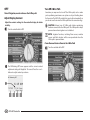
After FloManager is enabled and station and/or FloZone flow rates
are entered, FloManager works automatically in the background to
run stations based on available hydraulic capacity
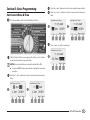
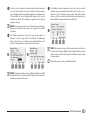
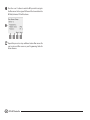
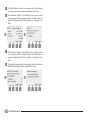
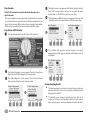
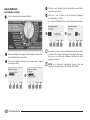
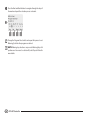
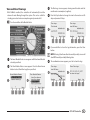
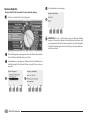
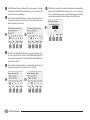
CThe Set Flow Rates screen appears. Press the Down Arrow button
to select Set FloZone Rates; then press Next.
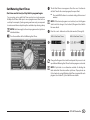
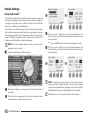
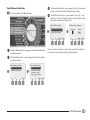
DThe FloZone Flow Rates screen appears. Press + and – (buttons 1
and 2) to select the desired FloZone number; then press - (button
4).
NOTE: FloManager can be used with or without flow sensing
hardware. If flow sensors are not present it will rely on manually
entered information; if flow sensors are present it will rely on
Learned Flow information, which is typically more accurate.
ESP-LXD Controller
81