1
MX-8000 User Manual
3-3 Fold Setting
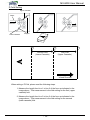
The following instruction shows how to set 81/2" x 11" size Z-Fold.
13mm
1. Unlock the fold position of the lower cassette by turning the stopper locking knob
counter clockwise.
2. Adjust the stopper so the surface of the rubber is lined up at 93mm.
3. Lock the stopper by holding the stopper adjustment knob and turning the stopper
locking knob clockwise.
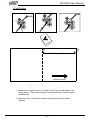
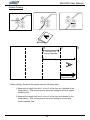
23mm
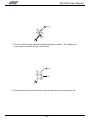
1. Unlock the fold position of the upper cassette by turning the stopper locking knob
counter clockwise.
2. Adjust the stopper so the red marker is lined up at 93mm.
3. Lock the stopper by holding the stopper adjustment knob and turning the stopper
locking knob clockwise.
- 13 -