1
Am186™CC Voice Over Ethernet CodeKit Software
V1.0 – September 1999
2 About the Software
The demonstration application enables a voice call to be placed from one board to another over a 10Base-T Ethernet
connection. Calls placed between boards must be on the same network because this application is not capable of
sending packets through routers.
The application begins by attempting to initialize the PCnet-ISA II Ethernet controller. During initialization, the
application checks to see if you have a programmed serial EEPROM connected to your PCnet-ISA II Ethernet
controller. The programmed EEPROM contains the MAC address for your board. The application treats the MAC
address as a phone number.
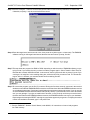
If your board does not contain a programmed EEPROM, the software manually initializes your PCnet-ISA II Ethernet
controller, then asks you to enter your 12-digit MAC address, which is used as your phone number (program status
is dumped through the serial port to your terminal program). The MAC addresses are in hexadecimal, so this poses
a problem with touch tone phones that just have digits 0-9. To enter an A,B,C,D,E, or F, press “9”, then press the
star (*) key and the 9 becomes an “A”; press the star key again and the A becomes a “B” and so on. When you have
the digit you want, continue to enter the rest of your address, using the same procedure for any other alphabetic
hexadecimal digits you encounter. You must press the “#” key when you are finished. Note that this same method
is used for dialing when placing phone calls.
NOTE: If you want to program the EEPROM on your board, Use the Serial EEPROM Programmer CodeKit software,
CK001101.EXE. You can download this software from the CodeKit Software section under Development Support
and Tools at http://www.amd.com/products/lpd/lpd.html.
When the software has identified your MAC address, you will hear a dial tone if you still have the receiver off the
hook. If you do not hear a dial tone then refer to “Trouble Shooting” on page 12. At this point you are ready to place
a call. Note that you must have a second board set up on the network with a unique MAC address.
To place a call, hang up the phone on the board you want to call. Use the phone on the first board to dial the MAC
address of the board you want to call. Remember to press the “#” key to actually place the call after you dial the
MAC address number. The phone on the second board will start ringing. After the phone is answered by someone
picking it up (takes the phone off the hook), a VOE link is established, and the call proceeds until one of the parties
hangs up (places the phone on the hook).
If you call a board on which the phone is off the hook, you hear a busy signal, indicating that the second party is
either placing a call or has a call in progress. During a call, if either party receives a call request from a third party,
the board receiving the call request transmits a busy packet to the third party.
The software does not have a terminate command unless you add one to the code yourself.
3 How the Software Works
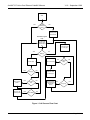
Although this software doesn’t include all of the features of a real Voice over IP system, the VOE software is still
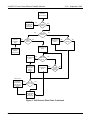
somewhat confusing. The call process is described by the flow chart beginning on page 7. The protocol used does
not follow any standard; the protocol was created solely for demonstrating the voice over Ethernet capabilities of this
CodeKit software.
Page 6 of 13