1
IDS440 Users Manual version 4.2
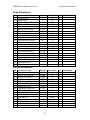
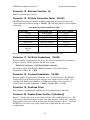
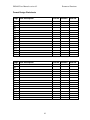
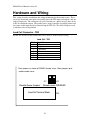
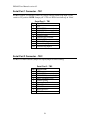
Serial Port 1 Connector - TB 1
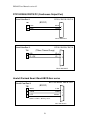
For RS232 input, set switch S1 to RS232 position, and for current loop input, set the
switch to CL position. NOTE: Jumper pin 7 CTS to 8 RTS if unit locks up on “Print”.
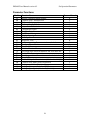
Serial Port 1 - TB1
Pin #
1
2
3
4
5
6
7
8
9
10
Signal Name
+5V
RS232 TXD (transmit data)
RS232 RXD (receive data))
DTR (220 ohm to +5V)
Ground (GND)
Current Loop Transmit
RS232 CTS (busy)
RS232 RTS (request to send)
Current Loop Input Current Loop Input +
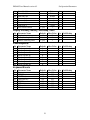
Serial Port 2 Connector - TB 2
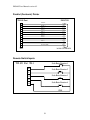
For RS232 or RS422/RS485 jumper JP3 input jumper to correct setting.
Serial Port 2 - TB2
Pin #
1
2
3
4
5
6
7
8
9
10
Signal Name
+5V
RS232 TXD (transmit data)
RS232 RXD (receive data)
DTR (220 ohm to +5V)
Ground (GND)
Current Loop Transmit
RS485 Transmit RS485 Transmit +
RS485 Receive RS485 Receive +
54