1
Eastsign Laminator II.WARM User Manual
1. Fuse
2. Power plug-in
3. Pedal switch plug-in
Fig. 2
1
2
3
4
5
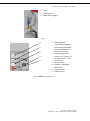
1. Heating Switch
If you switch between
Celsius and Fahrenheit,
press this button for 3
seconds. Press this
button again until it
shows “D-4”. Select “0”
for Celsius and “1” for
Fahrenheit
2. Motor Switch
3. Forward / backward
laminating
4. Speed control
5. Power switch
Fig.3 II.WARM control panel
Revised on July 15, 2013
Copyright © 2013 Eastsign International Limited