1
Configuring and Running 966R Tests
Digit Receiver Test
Sage’s Digit Analyzer verifies received DTMF/MF digits with displayed On/Off times, frequency, and level for each
digit received. Digit receiver detects ANSI Standards and RFC-2833 Digits. ‘Pre-Digit Timeout’: If no incoming call
setup digits are detected within this time, call setup proceeds without them. ‘Post-Digit Timeout’: Duration to wait
after last call-setup digit before proceeding with call-setup.
Create a Digit Receiver test that parses incoming digits. Min level = -25dBm, min duration = 40 ms, max freq
deviation = 10 Hz Responder by default.
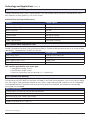
Command:
digrecv
Parameters
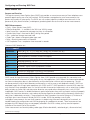
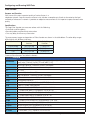
digrecv [-dn] [-sn] -if [-rn] [-log] [-dir] [-resp] [-mf] [-pre] [-post]
-dn
destination(Optional) Characters without whitespace
-sn
source #(Optional) Characters without whitespace
-if
IF# 1 to 6
-m
Resource#(Optional) 1 to 255
-log
Log File(Optional) Characters without whitespace
-dir
Be Director: # times to run {0}(Optional) 0 to 999
-resp
Be Responder(Optional)
-mf
Send MF call setup digits (CAS only) {DTMF}(Optional)
-pre
Pre-Digit Timeout (ms) {3000}(Optional) 0 to 60000
-post
Post-Digit Timeout (ms) {3000}(Optional) 0 to 60000
Example:
Create a digit receiver responder on channel 1 of span 2 that logs the digits to dig.csv:
digrecv -if 2 -rn 1 -log dig.csv
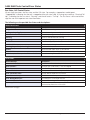
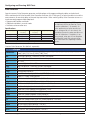
The results file will look like the following:
Date,Time,Test Name,Span Name,Channel(s), Digit, Type(MF|DTMF), Stage(‘-’|’+’) , lvl1, lvl2, freq1, freq2, off, on
08/08/2005,16:22:39,Digit Receiver,pcm1,1, 7, DTMF, -, -7, -7, 852, 1209, 2371, 50
08/08/2005,16:22:39,Digit Receiver,pcm1,1, 8, DTMF, -, -7, -7, 852, 1336, 50, 50
08/08/2005,16:22:39,Digit Receiver,pcm1,1, 9, DTMF, -, -7, -7, 852, 1477, 49, 51
08/08/2005,16:22:39,Digit Receiver,pcm1,1, 6, DTMF, -, -7, -7, 770, 1477, 50, 50
08/08/2005,16:22:39,Digit Receiver,pcm1,1, 5, DTMF, -, -7, -7, 770, 1336, 49, 51
08/08/2005,16:22:39,Digit Receiver,pcm1,1, 4, DTMF, -, -7, -7, 770, 1209, 49, 51
08/08/2005,16:22:39,Digit Receiver,pcm1,1, 1, DTMF, -, -7, -7, 697, 1209, 49, 51
08/08/2005,16:22:39,Digit Receiver,pcm1,1, 2, DTMF, -, -7, -7, 697, 1336, 50, 50
08/08/2005,16:22:39,Digit Receiver,pcm1,1, 3, DTMF, -, -7, -7, 697, 1477, 50, 50
08/08/2005,16:22:39,Digit Receiver,pcm1,1, 1, DTMF, -, -7, -7, 697, 1209, 50, 50
08/08/2005,16:22:39,Digit Receiver,pcm1,1, 2, DTMF, -, -7, -7, 697, 1336, 49, 51
08/08/2005,16:22:39,Digit Receiver,pcm1,1, 3, DTMF, -, -7, -7, 697, 1477, 49, 51
08/08/2005,16:22:41,Digit Receiver,pcm1,1, 7, DTMF, +, -7, -7, 852, 1209, 1360, 57
08/08/2005,16:22:42,Digit Receiver,pcm1,1, 3, DTMF, +, -7, -7, 697, 1477, 2263, 56
08/08/2005,16:22:42,Digit Receiver,pcm1,1, 5, DTMF, +, -7, -7, 770, 1336, 774, 56
The ‘Stage’ indicated in the results indicates if the digit was captured during call setup (a ‘-’) or after the call is up
(a ‘+’). The ‘off’ time is the ms elapsed since the last event (call setup beginning event or last digit trailing edge). The on time is the duration of the digit, in milliseconds.
Sage Instruments • 966R User Manual • 41