1
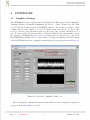
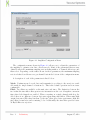
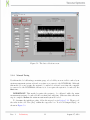
Single Cycle: This option is not user configurable.
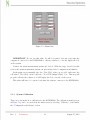
60 Hz filter: Add a 60 Hz notch filter to remove power grid noise. Recommended in locations that use 60 Hz power grid.
Filter Select: The number entered in this box determines the number of data samples
that are combined/averaged in the filter selected in “Filter Type” box before it is sent to
the computer. Increasing this number helps average many data samples which reduces the
noise in the digital values reported back to the software. However, the DCSGB1000 is only
capable of sampling at a maximum rate of 4800Hz. Applying filters that average samples
together reduces this maximum sample rate. The rate of data that is fed to the computer
software is the quotient of the maximum sampling rate divided by the filter select. For
example, if a value of 8 is typed in this box, the maximum data sample rate delivered to the
computer software (single channel mode) is 4800/8 or 600 samples per second. Setting this
value at 1 will cause the DCSGB1000 to send data samples (with no digital averaging) to
the computer at the maximum rate of 4800 samples per second. To set the filter select for
a custom application, follow these steps:
1. Per the Nyquist theorem, determine the highest frequency to be monitored and select
a sample rate at least double that frequency.
2. Set the filter select to produce a sample rate that is slightly greater than the sample
rate determined is step one.
It is recommended to use as much filtering as possible to still achieve the desired sample
rate.
Chop: Chop is enabled with AC Excitation.
AC Excitation: Optional AC excitation. This feature records one sample with the bridge
excited with default polarity then records another sample with opposite polarity. When active, this feature virtually eliminates DC-induced offset error providing exceptional accuracy
at the expense of data rate.
Channel: Select which of the two channels to collect data from. This only affects burst mode
- single channel reads will still read from the ”‘single read”’ channel regardless of this setting.
Polarity: This option is not user configurable.
Gain: Select how much amplification to use for your application. It is recommended to use
as much amplification as possible without saturating. The values will either be 0 or 16777215
during saturation.
Rev. 1
Preliminary
8
August 17, 2012