1
| Knowledge Base | 149
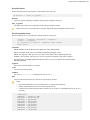
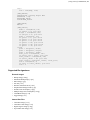
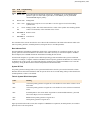
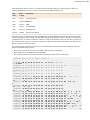
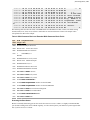
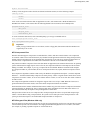
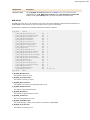
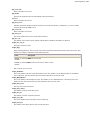
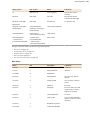
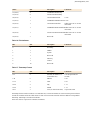
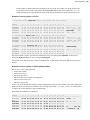
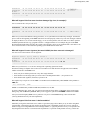
00000150:
00000160:
00000170:
00000180:
00000190:
000001A0:
000001B0:
000001C0:
000001D0:
to
000001E0:
000001F0:
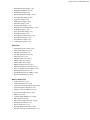
FF
C3
B4
EB
20
0D
6E
6D
20
06
A0
01
F2
65
0A
67
70
43
10
F8
8B
C3
72
4E
00
72
74
00
01
F0
0D
72
54
0D
65
72
FF
E8
AC
0A
6F
4C
0A
73
6C
0E
09
3C
41
72
44
4E
73
2B
0E
00
00
20
20
52
54
65
41
00
A0
74
64
6F
20
4C
64
6C
-
0F
FB
09
69
63
69
44
00
74
85
01
B4
73
63
73
52
0D
2B
6F
E8
0E
6B
75
20
20
0A
44
FF
03
BB
20
72
6D
69
50
65
07
00
07
72
72
69
73
72
6C
1F
FB
00
65
65
73
20
65
20
66
EB
CD
61
64
73
63
73
74
61
FE
10
64
00
69
6F
73
6F
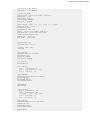
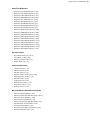
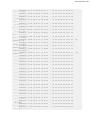
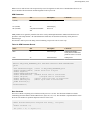
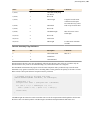
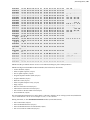
..........o...fa
................
.....<.t........
.....A disk read
error occurred.
..NTLDR is missi
ng...NTLDR is co
mpressed...Press
Ctrl+Alt+Del
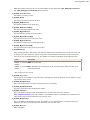
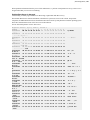
20 72 65 73 74 61 72 74 - 0D 0A 00 00 00 00 00 00 restart........
00 00 00 00 00 00 00 00 - 83 A0 B3 C9 00 00 55 AA ..............U.
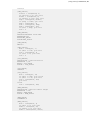
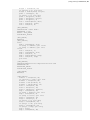
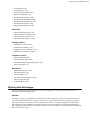
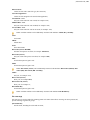
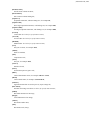
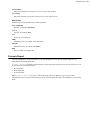
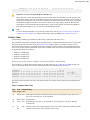
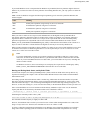
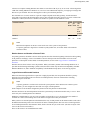
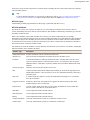
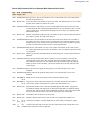
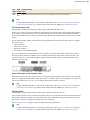
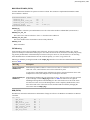
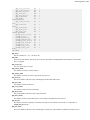
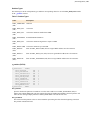
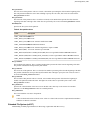
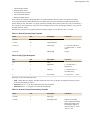
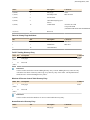
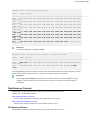
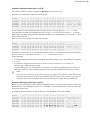
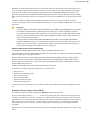
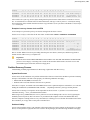
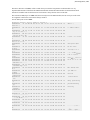
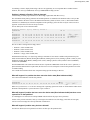
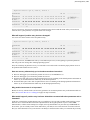
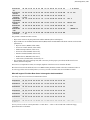
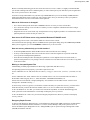
The following table describes the fields in the BPB and the extended BPB on NTFS volumes. The fields starting
at 0x0B, 0x0D, 0x15, 0x18, 0x1A, and 0x1C match those on FAT16 and FAT32 volumes. The sample values
correspond to the data in this example.
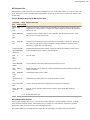
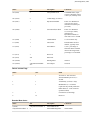
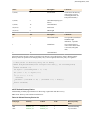
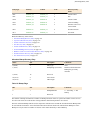
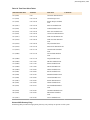
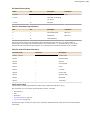
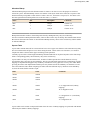
Table 3: BIOS Parameter Block and Extended BIOS Parameter Block Fields
Byte Field SampleField Name
Offset Length Value
0x0B WORD 0x0002 Bytes Per Sector
0x0D BYTE 0x08
Sectors Per Cluster
0x0E WORD 0x0000 Reserved Sectors
0x10
3
0x000000
always 0
BYTES
0x13
WORD 0x0000 not used by NTFS
0x15
BYTE 0xF8
0x16
WORD 0x0000 always 0
0x18
WORD 0x3F00 Sectors Per Track
Media Descriptor
0x1A WORD 0xFF00Number Of Heads
0x1C DWORD
0x3F000000
Hidden Sectors
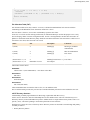
0x20
DWORD
0x00000000
not used by NTFS
0x24
DWORD
0x80008000
not used by NTFS
0x28
LONGLONG
0x4AF57F0000000000
Total Sectors
0x30
LONGLONG
0x0400000000000000
Logical Cluster Number for the file $MFT
0x38
LONGLONG
0x54FF070000000000
Logical Cluster Number for the file $MFTMirr
0x40
DWORD
0xF6000000
Clusters Per File Record Segment
0x44
DWORD
0x01000000
Clusters Per Index Block
0x48
LONGLONG
0x14A51B74C91B741C
Volume Serial Number
0x50
DWORD
0x00000000
Checksum
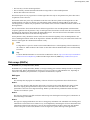
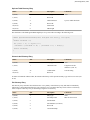
Protecting the Boot Sector
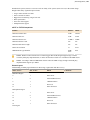
Because a normally functioning system relies on the boot sector to access a volume, it is highly recommended that
you run disk scanning tools such as Chkdsk regularly, as well as back up all of your data files to protect against data
loss if you lose access to a volume.