1
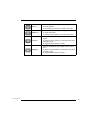
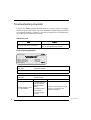
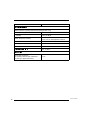
6WDWXVILHOG
0(66$*(
0HVVDJH
$FWLRQ
•
•
•
•
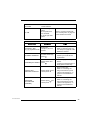
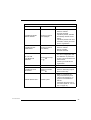
Press Confirm key.
Remove cassette.
Re-insert cassette.
If problem persists, initialize
and identify cassette via ID
station.
• If problem persists with other
cassettes, contact your local
service organization.
CASSETTE READ/
WRITE ERROR
Press , remove
and try again
CASSETTE NOT
IDENTIFIED
Press , remove
and identify
•
•
•
•
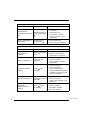
24 X 30 CM
CALIBRATION
MISSING
Press
or
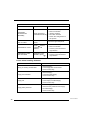
• Press Confirm key to treat
24 x 30 cm image plate without calibration or press Cancel key to treat cassettes with
other formats.
• Contact your local service
organization.
SERVICE MODE
Please wait
Wait.
CASSETTE SLOT
BLOCKED
Remove cassette,
press
• Remove cassette.
• Remove obstructing objects.
• Press Confirm key.
Check queue
• Refer to µ&RQVXOWLQJWKH
LPDJHWUDQVPLVVLRQTXHXH
µ4XHXHPDQDJHPHQW¶¶RQ
SDJH of the Reference
manual.
• Check that the ADC Solo is
not off line (Refer to µ7KHGLV
SOD\¶RQSDJH).
IMAGE-QUEUE FULL
2301A GB 19990507
/2&.('
to accept
Press Confirm key.
Remove cassette.
Identify cassette.
Re-insert cassette.
37