1
Page 16 - FAQs
IW-capable. R/T part numbers 4101658-506 and lower are
not IW capable and will require the hardware upgrade once
the IW feature is purchased.
All AN/PRC-148(V)5 and (V)6 JEMs already have IW enabled.
IW capability started with firmware version 7.0.
The MBITR to JEM Upgrade Program allows the turn-in of
MBITRs to receive new JEMs at a discounted price. The
hardware of these JEMS will be IW capable; however, it will
be necessary to purchase the IW feature.
Q: What does the error “JEM Radio Serial Number 0 Not
Eligible for the Update Package Selected” mean?
A: This means the Software Maintenance feature, shown as
“SW MAINT,” is not enabled in the radio. This feature must
be enabled before you can upgrade JEM firmware beyond
version 3.0.
Ensure the latest version of the JEM PC Configuration
Toolkit is installed on the computer. Registered users
can download this from our website.
To proceed,
the PC must have the latest JEM enabler database files. If
the PC is connected to the Internet, these can be downloaded
using the JEM PC Configuration Toolkit by selecting the
“Tools” drop-down menu and selecting “Load New Enabler
Database.” If you have no Internet connection, contact
Customer Service, 1-800-914-0303, option 1, or customer.
service@thalesdsi.com to email the two encrypted .txt files
that make up the enabler database.
Once you have the updated enabler database files, you
can drag or copy them to the C:/Program Files (or Program
Files x86)/Thales Communications/JEM PC Toolkit folder
and overwrite the existing files. This updates the enabler
database.
Connect the JEM to the computer using the JEM USB
programming cable. Ensure the radio’s side connector is
enabled and the password has been entered to put the radio
into PC Toolkit Session Receive Ready mode.
With the radio connected, on the PC Configuration Toolkit
select the “Tools” drop-down menu and select “Update Radio
with Factory Enabled Options.” A pop-up will show on the
PC Configuration Toolkit. Wait about 15 seconds, then click
“Update.” A notification is displayed on the PC Configuration
Toolkit, and the radio will reboot when this process is complete.
Once the radio reboots, you can verify the “SW MAINT”
feature is enabled by holding “ALT,” pressing “MODE,” then
press “ENT” on “MAINTENANCE,” then press “ENT” on
“OPTIONS.” It may be necessary to use the down arrow to
see the “SW MAINT” feature.
With the “SW MAINT” feature enabled, the radio firmware
upgrade can be completed.
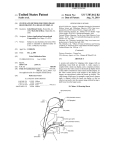
Q: What is wrong in this picture?
A: The SINCGARS blade antenna is folded-up,
this significantly reduces the communication
range/distance. For best SINCGARS band
range/distance, the antenna should be fully
extended.
Typical line-of-sight range of a PRC-148,
transmitting at 5W, is 5km, that is 1km/W.
www.thalesdsi.com
Customer Commitment