1
•
•
•
Scroll your scrolll wheel up and down to navigate your BlackBerry.
Click the scroll wheel to select (when not in mouse control mode).
Click the right mouse button to escape.
Disconnecting from your BlackBerry
When you wish to stop using the viaDock with your BlackBerry, terminate the connection using
any of the following methods:
•
•
•
On the BlackBerry, select the Impatica Connector application. From the Stop Projecting
dialog box that appears click OK; or
On your computer, close the Impatica viaDock application; or
If connected via USB, disconnect the cable.
SECTION 4: Switching BlackBerry Applications
Impatica viaDock offers the following quick ways to switch between the applications that are
currently running on your BlackBerry:
•
•
Using the application launcher
Using the Go menu
The following section will explain both of these methods in detail.
Using the Application Launcher
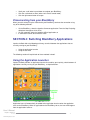
Impatica viaDock provides an application launcher that enables you to quickly switch between all
applications currently running on your BlackBerry, as depicted below:
Application icons will automatically be added to the application launcher when the application
starts on the BlackBerry. When an application on the BlackBerry closes, the icon will disappear
from the application launcher.
User’s Manual
Impatica viaDock
V 1.0.2
www.impatica.com
11