1
z
Video backup
4.4.1
Video playback
Local playback and remote playback
Users can play back video files in a channel within a fixed playback period set
in the control center. At playback, users can select four channels
simultaneously at most. This system supports local playback and remote
playback. The local playback is to play the files in the local, and the remote
playback refers to play the files in the remote DVR, which is much more
convenient to operate. Although these two types playback are different from
the path of record files, they have the same settings and other operations.
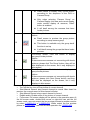
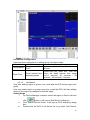
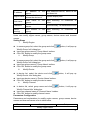
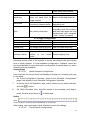
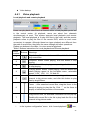
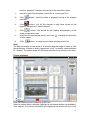
Please use buttons in the table 1 to view record at playback.
Table 1 Buttons instructions for Local playback and Remote playback:
Serial
Buttons Meanings
number
Play button. After searched record files, click this button to
1
play record files
“Suspend” button. When playing, click this button to stop
2
playing
“Stop“ button。When playing or suspending, click this button
3
to stop playing
“Playing speed” button. When playing, click this button and
select playing speed at the pull-down menu, selectable
4
speed : 1/4X,1/2X,1X,2X and 4X.
“Next frame" button, when suspending, alter present
5
channel to big picture mode, and click this button to play
files by single frame.
6
Fence 。After searched record files, drag the fence to the
period of playing to play the file. Click “ ” on the fence to
amplify or shrink the precision of time scalar
7
Drag mouse here, all searched information list will pop up.
Double-click record file in the list to play back the file in the
channel in big picture mode.
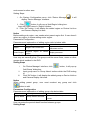
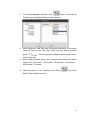
Setting Steps
i.
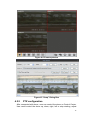
In the “system configuration” menu,click “record playback”
icon,
36