1
ULTRADRIVE PRO DCX2496
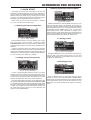
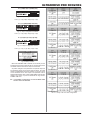
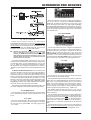
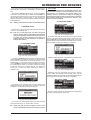
Fig. 4.53: Store ß Delete/Format
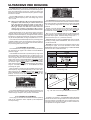
Fig. 4.57: Store ß Copy
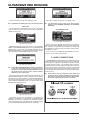
Confirm formatting with OK. Press CANCEL to quit.
+
ATTENTION: Formatting will also erase locked presets!
Press OK to complete the process, or CANCEL to quit.
+
4.8.3 COPY
It is impossible to copy a bank to the same memory
location (e.g. ALL INTERNAL PRESETS to ALL INTERNAL
PRESETS).
On the third page of the STORE menu you can copy presets
within one bank or from the internal memory (INT) to a PCMCIA
CARD, and vice versa.
4.8.4 PRESET-LOCK
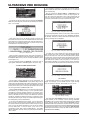
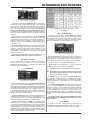
Fig. 4.58: Store ß Preset-Lock
Fig. 4.54: Store ß Copy
SOURCE selects the memory from which to copy (SOURCE
BANK), while DESTINATION determines the DESTINATION
BANK. Below, you can select the SOURCE PRESET and the
DESTINATION PRESET. The display indicates both the number,
name and status (LOCKED/UNLOCKED) of the preset.
The last page of the STORE menu allows you to LOCK or
UNLOCK your presets. SELECT selects the corresponding bank
(INT or CARD), the right-hand window displays the preset. Use
ALL PRESETS to select all presets. Press OK to lock the preset,
or CANCEL to unlock it.
Here, you can unlock a DESTINATION PRESET you wish to
overwrite, or lock recently copied presets.
5. AUDIO CONNECTIONS
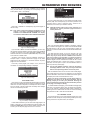
Fig. 4.55: Store ß Copy
+
Locked DESTINATION PRESETS cannot be overwritten.
In this case, the display informs you that the process
cannot be completed. Since SOURCE PRESETS will not
get lost during the copying process, it does not matter
whether they are locked or not.
When all settings have been made and confirmed with OK, the
DESTINATION PRESET is directly overwritten and the display
indicates the name of the new preset. Locked SOURCE PRESETS
are stored as unlocked presets. To lock them, go to the next page
of the STORE menu (PRESET-LOCK). You can also unlock locked
DESTINATION PRESETS there.
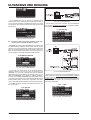
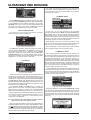
The BEHRINGER ULTRADRIVE PRO DCX2496 has standard
electronically balanced inputs and outputs. The circuit design has
an automatic hum suppression with balanced signals and is able
to operate, without problem, even at highest levels. Externallyinduced mains hum etc. is thus efficiently suppressed. The servofunction, also automatic, recognizes the connection of unbalanced
pin assignments and changes the nominal level internally so that
there is no difference in level between the input and output signals
(6 dB correction).
+
Please ensure that only qualified persons install and
operate the device. During installation and operation the
user must have sufficient contact to earth. Electrostatic
discharges might affect the operation of the unit.
Fig. 4.56: Store ß Copy
Additionally, you can copy all presets in one operation, by
selecting ALL PRESETS in both SOURCE and DESTINATION
PRESETS. Prior to that, all presets in the destination memory
must be unlocked. When you confirm with OK, the displays warns
you that all DESTINATION PRESETS will be overwritten.
20
5. AUDIO CONNECTIONS
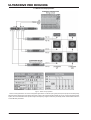
Fig. 5.1: XLR connections