1
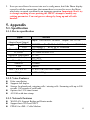
2. Even you are allowed to access into user’s config menu, but if the Phone display
correctly with the current time, that means there is no need to access the Menu
which may occurred a problem by an improper operation. Important: Don’t try
to change anything in case pressing the MENU attempt to modify any
existing parameter. You can ignore a change by hang up and off with
handset.
5. Appendix
5.1. Specification
5.1.1. Device specification
Item
AC
Adapter(Input/Output)
WAN
Port
LAN
Power Consumption
LCD size
Operation Temperature
Relative Humidity
Main Chipset
SDRAM
Flash
Size(W x H x D)
Weight
Details
Input:100-240VAC 50-60Hz Output:DC 5V/1A
10/100Base- T RJ-45 for LAN from Router/ ADSL Modem
10/100Base- T RJ-45 for PC Extension
Idle:1.5W/Active:1.8W
74 x 28mm dot-matrix LCD
0~40℃
10~65%
BCM 1190
16Mbits
4Mbits
11.6×8×3 in.(295×205×75mm)
2.07lb.(0.94kg)
5.1.2. Voice Features
l
l
l
l
l
Echo cancellation
Supports full duplex.
Storage for phonebook, outgoing calls / missing calls / Incoming calls up to 500
records. 100 records of each band.
Options for 12/24 time format.
All Calls with time stamp
5.1.3. Network Features
l
l
l
WAN/LAN: Support Bridge and Router mode.
Support basic NAT and NAPT
PPPoE for xDSL / Cable Modem
12