1
Enjoy Smarter Life!
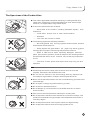
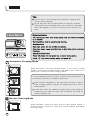
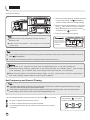
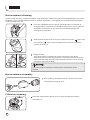
Dust sensor cleaning
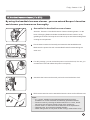
The dust sensor is located at the front of dust
entrance. It is able to detect the concentration of
dust so that it can choose efficient mode to work.
We suggest you to clean dust sensor once you
clean dust box to improve work efficiency.
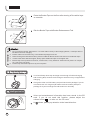
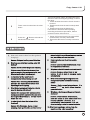
1. Turn off power.
2. Take out dust box and clean it.
Replacing the batteries
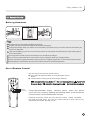
Your Robot is fitted with two 6V 2500mAah Ni-MH battery packs. The battery packs must be replaced together.
Never mix an old Battery pack with a new Battery pack.
Only use ECOVACS approved replacement parts for your Robot. Use of parts that are not approved by
ECOVACS are dangerous and will invalidate your warranty.
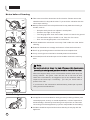
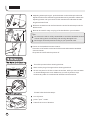
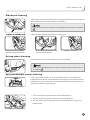
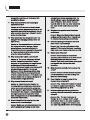
Before attempting to change the Batteries, make sure your Robot is turned Off.
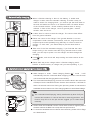
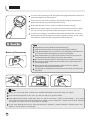
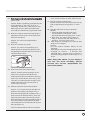
Turn your Robot over and
place it on a level surface.
Remove the screw from the
Battery cover.
Remove the Battery cover.
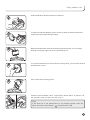
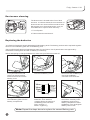
Disconnect the old Battery by
removing the Battery
connector from its socket.
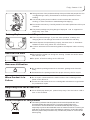
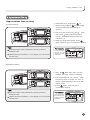
Yellow
Yellow
Black
Red
Using the battery leads, lift
the old Battery pack from the
Battery compartment.
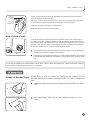
When fitting the new
Batteries, strict attention
must be paid to the polarity of
the Battery pack connector:
Red - positive (+)
Black - negative (-)
Connect the new Battery to
the socket. Carefully lower
the Battery pack into the
Battery compartment. Refit
the Battery cover and tighten
Battery cover screw.
Note: Repeat the steps above to replace the second Battery pack.
34