1
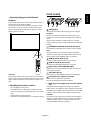
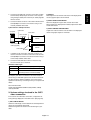
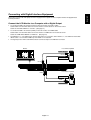
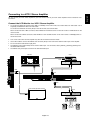
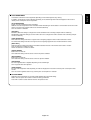
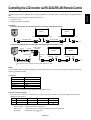
You can connect your VCR / stereo amplifier to your LCD monitor. Refer to your VCR / stereo amplifier owner's manual for more
information.
Connect the LCD Monitor to a VCR / Stereo Amplifier
•
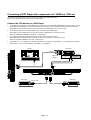
To connect the VIDEO IN connector (RCA, BNC or S-VIDEO) on the LCD monitor, use a video cable or S-video cable. Use a
separately available RCA cable or S-video cable.
To connect the AUDIO IN connector (RCA) on the LCD monitor, use an RCA cable.
When connect the RCA or BNC connector, select VIDEO from the INPUT button on the LCD monitor or VIDEO button on the
remote control.
When connect the S-VIDEO connector, select VIDEO<S> from the INPUT button on the LCD monitor or VIDEO(S) button on
the remote control.
•
•
•
•
Turn on the LCD monitor and the amplifier only after all connections have been made.
Use an RCA cable to connect the AUDIO OUT connector (RCA) on the LCD monitor and the audio input on the amplifier.
Do not reverse the audio left and right jacks.
The AUDIO IN 2 and 3 (both RCA) can be used for audio input. For connection, select [AUIDO1], [AUDIO2], [AUDIO3] from
the AUDIO INPUT button.
The AUDIO OUT jack outputs sound from the selected Audio input.
•
Monitor
VCR
To video output
RCA
To audio output To audio output
L
R
RCA
BNC
RCA
RCA
RCA
LCD monitor (second monitor)
RCA
To audio input
L
BNC
To audio input
R
Stereo amplifier
External
speaker
English-19
English
Connecting to a VCR / Stereo Amplifier