1
GS/DURAPULSE Accessories – Software
System Requirements
To run GSoft, your PC must meet the
following requirements:
• Windows 95, 98, Me, NT, 2000 or XP
• Internet Explorer 4.0 or higher
(for HTML help support)
• 24 Mb of available memory
• 8Mb hard drive space
• Available RS-232 serial port
Overview
GSoft, the configuration software for the
GS/DURAPULSE drives, allows a personal
computer to be directly connected to the
drives via RS-232 or RS-485 (RS-485
requires FA-ISOCON or user supplied
converter). You can perform a variety of
functions to allow easy, intuitive, and
secure set-up of any application that is
required using GSoft.
Features
• Create new drive configurations using one
of three views:
• Quick Start - Allows for just the basic
set-up to get quick and simple applications up and running ASAP.
• Detailed - The complete set-up of all
parameters in the drive.
• Schematic Views - Set up the drive using
the interactive schematic view. Create a
printable cad-like drawing at the same
time for future documentation and
maintenance-friendly activities.
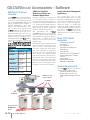
GSoft offers three software configuration methods
PLC
Overview
• Upload/download drive configurations.
• Edit drive configuration .
• Archive/store multiple drive
configurations on your PC .
• Trend drive operation parameters in
real time.
• Maintenance keypad will allow the user to
commission the drive from the PC, check
rotation, and run a basic cycle.
• Live PID tuning with active tuning control.
Take the difficulty out of PID tuning with a
real time trend.
• View drive faults.
• OPC client with KEPDirect EBC I/O server
over the Ethernet with the GS-EDRV option
card
• Have a large system with KEPDirect
already being used to supply information
to your SCADA system? Now program
online with drive changes.
GS/DURAPULSE AC Drive Software
Part Number
Description
GSOFT
GS-232CBL
configuration software
FA-ISOCON
RS-232 to RS-422/485
converter with ANTE
RS-232 cable
Can be used with all series GS/DURAPULSE drives;
FA-ISOCON required for GS1 and DURAPULSE drives.
DL05/06
PLC
DL105
PLC
DL205
PLC
DL305
PLC
DL405
PLC
Field I/O
Software
C-more
HMIs
Other HMI
AC Drives
Motors
Steppers/
Servos
Motor
Controls
Proximity
Sensors
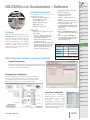
Detailed Configuration
Photo
Sensors
The Detailed Configuration method provides AC drive parameter
access in a tabbed dialog format. Detailed Configuration can be
used for new or existing configurations.
Limit
Switches
Encoders
Pushbuttons/
Lights
Schematic View Configuration
Process
The Schematic View Configuration method uses a schematic
picture of the AC drive and external connections to guide
you through the setup of the AC drive. The Schematic View
method can be used for new or existing configurations.
Relays/
Timers
Comm.
TB’s &
Wiring
Power
Quick Start Configuration
Enclosures
The Quick Start Configuration
method guides you through the
most commonly used AC drive
parameters.
Quick
Start
Configuration may ONLY be used
to create a new configuration. Once
created and saved, subsequent
editing is done using the Detailed or
Schematic View methods.
Drives/Motors/Motion
Appendix
Part Index
12–73