1
APPEL
Track changes
Agreements > Agreements search screen
Click on 'Agreement' in the main menu of APPEL. The 'Agreements search' screen is
shown. Search for an Agreement in the status 'ongoing'. The function 'Track changes' is shown.
Track changes of two documents
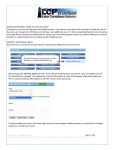
1. The result In the result list, you select two versions to compare.
2. Click on the check box to select two documents to compare.
3. Click on 'Track changes' at the top right of the screen.
4. A popup window will be shown with both documents in two columns. The differences will
be highlighted in the two columns.
Tips
♦
♦
Click on the column title 'Reference Number' to order the result list.
Click on 'Print' in the popup window to print a paper version of the comparison.
Remarks
♦ Click on 'Track changes' without checking two items of the list and the following
message is be shown: 'You have to choose 2 documents to compare'.
36