1
TUTORIALS AND GLOSSARY
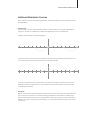
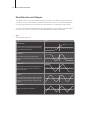
With Interpolation at zero position, the waves are blended as smoothly as possible, with the mid-point
between each wave representing a 50/50 mix of the two nearest waves. As you increase the value, an increasingly large “dead-zone” is created between each of the original waves, and the blend rate is increased
accordingly until, at the maximum value (127), a stepping effect is achieved.
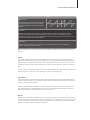
The net result is a very different characteristic from when the waves are blended smoothly, in two very important ways: firstly, that slow LFO modulations of Wavetable Index will generally result in a somewhat rhythmic
effect that is difficult to achieve by other means, and secondly, the original waves will be presented much
more distinctly, and may often appear much brighter as a result (not that they are, mind – it’s just that pinpointing the exact value out of 128 possibilities at which a wave is not blended with any other, can be rather
tricky!)
Interpolation is also available as a destination in the Mod Matrix . Please select Osc1/2 Interpolation.
•• Formant
‘Formants’ are the peaks in the frequency spectrum of a given sound, created by a resonant body or system. Typically, they are associated with human speech, as it is largely the ways in which we alter the resonant characteristics of our mouth and nasal passages that determine the different vowel sounds.
If you would like a more in-depth explanation, please click on the following link:
http://en.wikipedia.org/wiki/FormantDepending on what you want to achieve you need to lock all aspects of
a patch minus the one you want to change (see the arpeggiator example above) or lock a single aspect (like
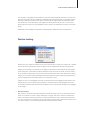
in the Delay example). To ease this task you can choose more options from a context menu by right clicking
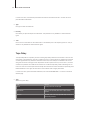
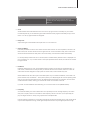
on a header bar. The context menu offers to lock all, unlock all, invert the locking status and choose from a
couple of presets. Please note that every entry within the context menu will change the selection of the active part and not all parts at the same time.
The Easy, Browser and Common pages don’t allow their sections to be locked. Nevertheless you can unlock
all section on the browser page by choosing the appropriate menu entry within the context menu (right click).
•• Tips and tricks
The possibilities of Section Locking are endless. You can use it to store templates in other patches. Just
imagine to store you favorite home grown user arp patterns and use them in any other patch you like. Section Locking can also act similar to a random patch generator. Lock everything minus the Oscillators and dial
through patches. The sound will change but the overall aesthetics of how the patch react will stay the same
because the envelopes, LFOs and effects are the same.