1
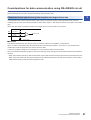
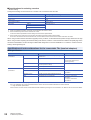
■Considerations for selecting a TA
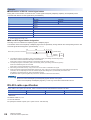
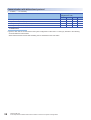
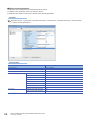
• Configure the setting as shown below for a TA to be connected to the C24 side.
Setting item
Setting range
Communication rate
Depends on the TA in use
Modem command
Hayes AT command
SI/SO control
None
Communication method
Nonprocedural
Data format
Data bit
2
Match with C24*1, *2
Stop bit
Parity bit
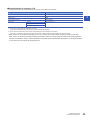
*1
*2
Some TAs may transmit one character as 10 bits.
Check the TA specifications when setting C24 transmission specifications.
Some TAs may switch the communication rate following the start of data communication.
Since C24 cannot switch the communication rate, set the TA side so that its communication rate does not switch.
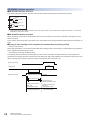
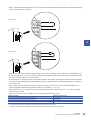
• When using a TA whose DR terminal (signal) is set by a switch, set the DR terminal (TA output) switch level to High.
When using a TA requiring DR terminal setting with software, write the command that turns ON the DR (DSR) signal into
the data for initialization. Set the "Modem initialization DR (DSR) signal enable/disable designation" to "DR signal enabled"
in the modem function setting with Engineering tool.
2 SPECIFICATIONS
2.4 Modem Specification
33